



Get the first look at Cadient Talent MCP - your ATS, now connected to AI

TECH TIP: WEBSITE NOT LOADING WITH CHROME

cv3marketing April 19, 2021
Sign In with Google

Trusted by leading organizations


Google released Chrome Version 80 in February 2020. As part of an ongoing effort to improve privacy and security across the web, it began enforcing secure-by-default handling of third-party cookies. This change may result in issues where your website is not loading with Chrome. Explore solutions to address these problems and ensure your site remains accessible

Are you experiencing issues where a website is not loading with chrome browser but does display in Firefox and Internet Explorer/Edge? It could be due to your settings.

In Chrome, there is a page where these settings can be changed. Open a Chrome browser session and type the following:

Chrome://flags

The following page will appear:
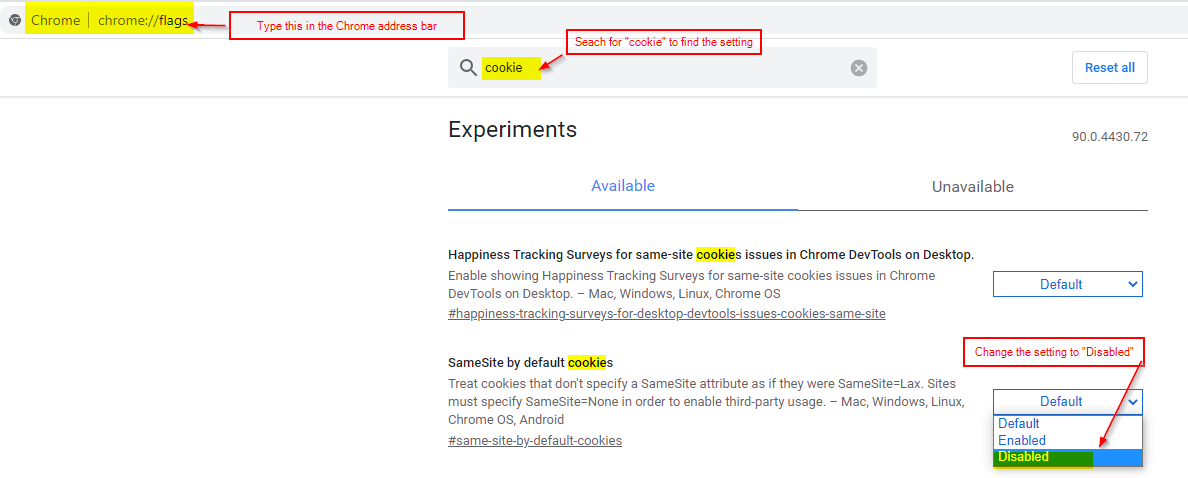
Try changing the “cookies” setting to “Disabled” to see if this helps the page load correctly.

For more technical tips, click here.

Related Articles

Solutions built for this challenge

Solutions Built for Modern Hiring

SmartRefer

Turn your employees into your best recruiters.

  • Share jobs via tracked link, QR code, or email
  • Earn points, badges & cash bonuses
  • Live leaderboards & referral analytics
Try this product — SmartRefer

SmartShield

See past the polish on every resume.

  • Research any resume in about 30 seconds
  • Employers, credentials & public profiles checked
  • Every finding cited — you make the call
Try this product — SmartShield

Not sure which solution fits your organization?

Our experts can help you design a tailored approach for your unique hiring challenges.